Preferences
Access the following add-on preferences by going to Edit -> Preferences -> Add-ons and expanding the Quad Maker entry.
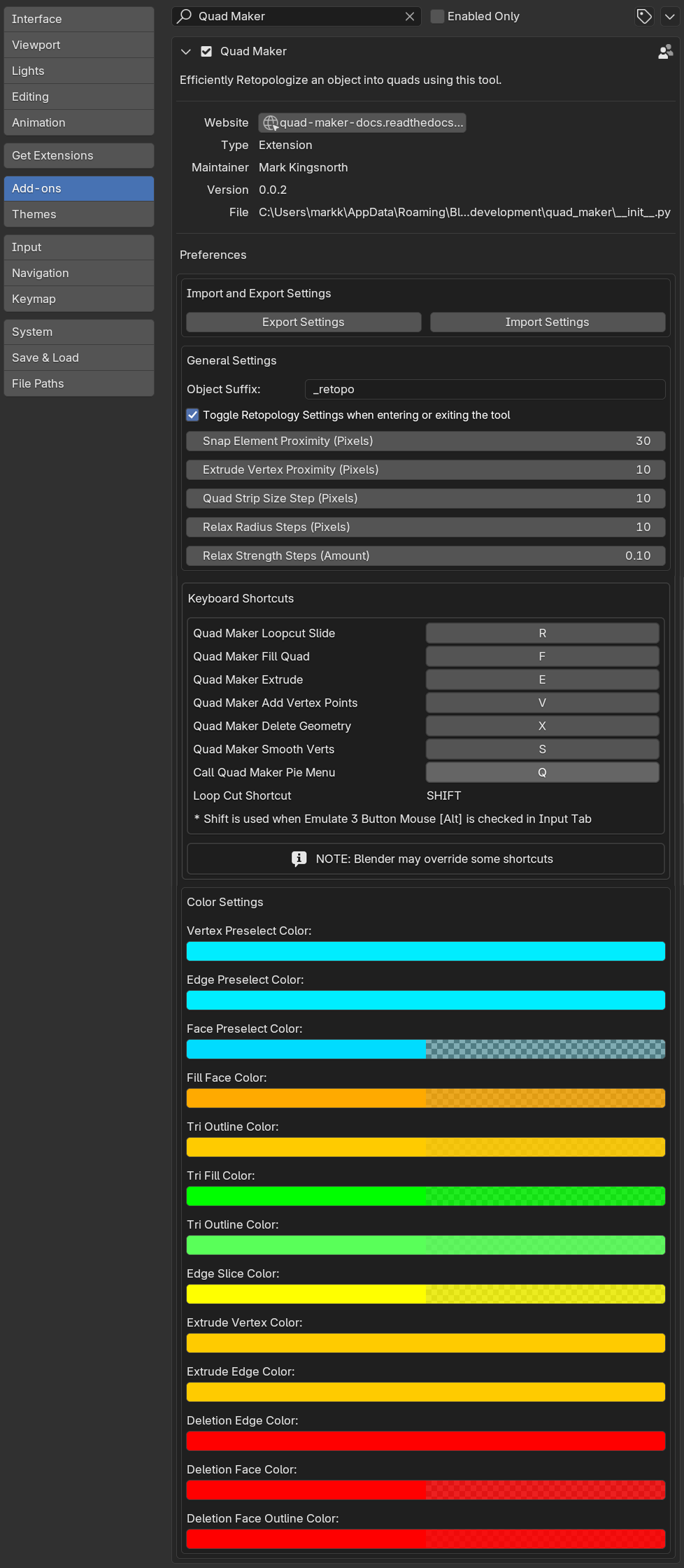
General Preferences
Object Suffix
The suffix to add to the end of the new object name when creating a new object through Quad Maker.
Toggle Retopology Settings when Entering or Exiting the Tool
When enabled, the retopology settings will be toggled on or off when entering or exiting the Quad Maker tool.
Snap Element Proximity (Pixels)
How close to another element a vertex needs to be to snap to it when snapping is enabled.
Extrude Vertex Proximity (Pixels)
How close to the mouse needs to be to a vertex to extrude it a face from it when using the Extend Borders operation.
Quad Strip Size Step (Pixels)
When increasing or decreasing the size of the Quad Strip, how much to increase or decrease the size by.
Smooth Radius Steps (Pixels)
When increasing or decreasing the size of the Smooth brush, how much to increase or decrease the size by.
Smooth Strength Steps (Amount)
When increasing or decreasing the strength of the Smooth brush, how much to increase or decrease the strength by.
Keyboard Shortcuts
This allows you to change the keyboard shortcuts for each operation in Quad Maker.
Note
If Emulate 3 Button Mouse is checked under Blender’s Edit - Preferences - Input tab and the Alt key is used as the middle mouse button, the shift key is always used to perform loop selections
Color Settings
These allow you to change the color for each operation in Quad Maker.